A fully customised solution
Your syllabus, your learning outcomes, your language and your state's own look, built into one digital school.
 for Governments
Bring your curriculum, language and learning priorities to classrooms and homes, with one connected view of progress.
Your syllabus, your learning outcomes, your language and your state's own look, built into one digital school.
One programme team, regular progress reports to the department, and dashboards from the school to state leadership.
A teacher-led classroom experience using one tablet and a connected display, with participation from every child.
The Learn and Play app gives children self-paced lessons and practice on their phone or tablet.

In the classroom
One tablet, a connected display and a classroom ready to learn.
One tablet per classroom of 20 to 30 students, connected to a TV display.
The teacher logs in once and enters the class roster.
The teacher selects the subject and topic from a clean, organised dashboard.
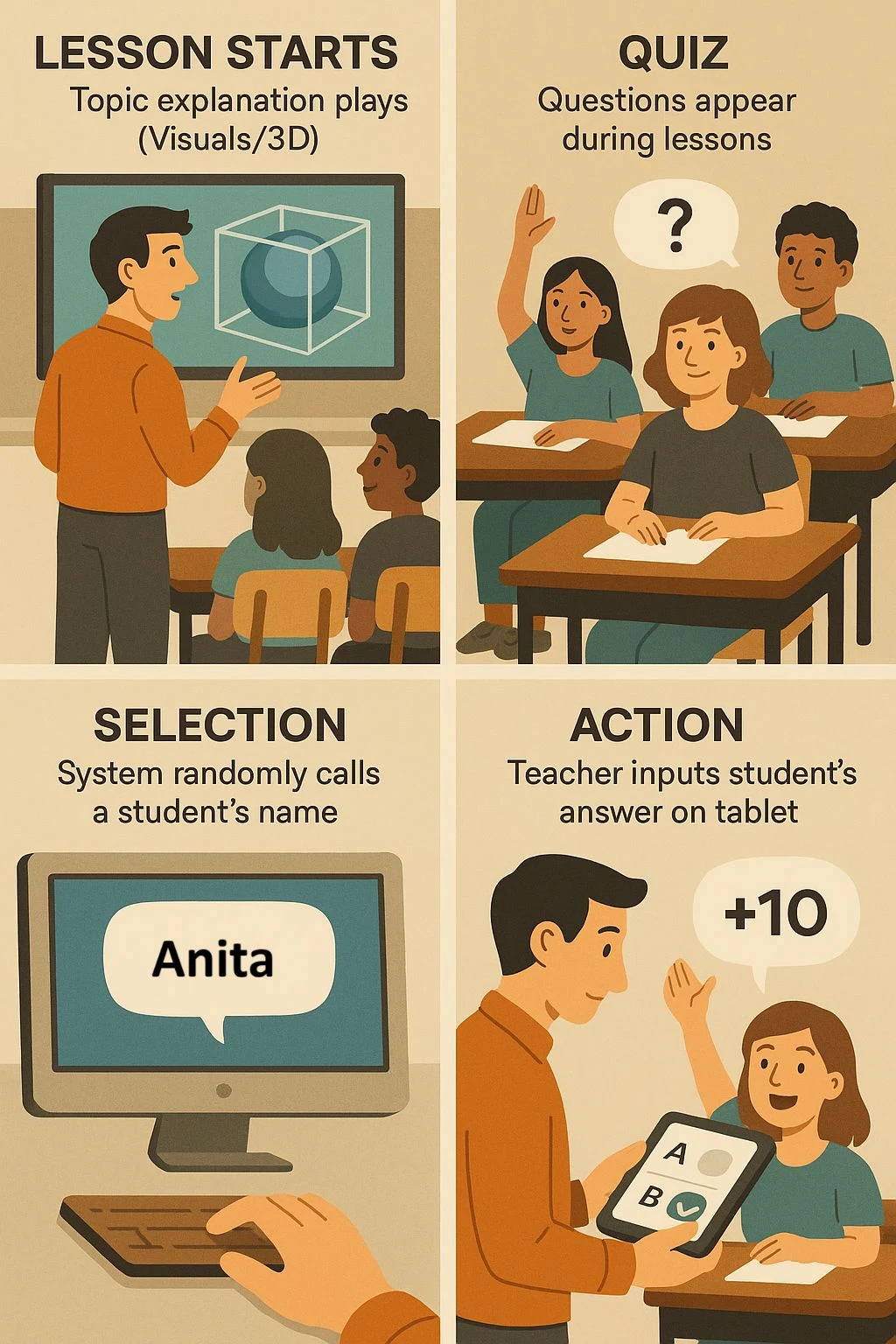
The interactive lesson launches on the TV with 3D visuals.
In the lesson
Every child participates, and every child builds confidence.
3D lessons fill the classroom screen.
Interactive questions appear during the lesson to check understanding.
The system calls a student's name at random, so every child gets a turn.
The teacher enters the student's answer on the tablet.
A correct answer earns points. An incorrect one passes to the next student.
From classroom to department
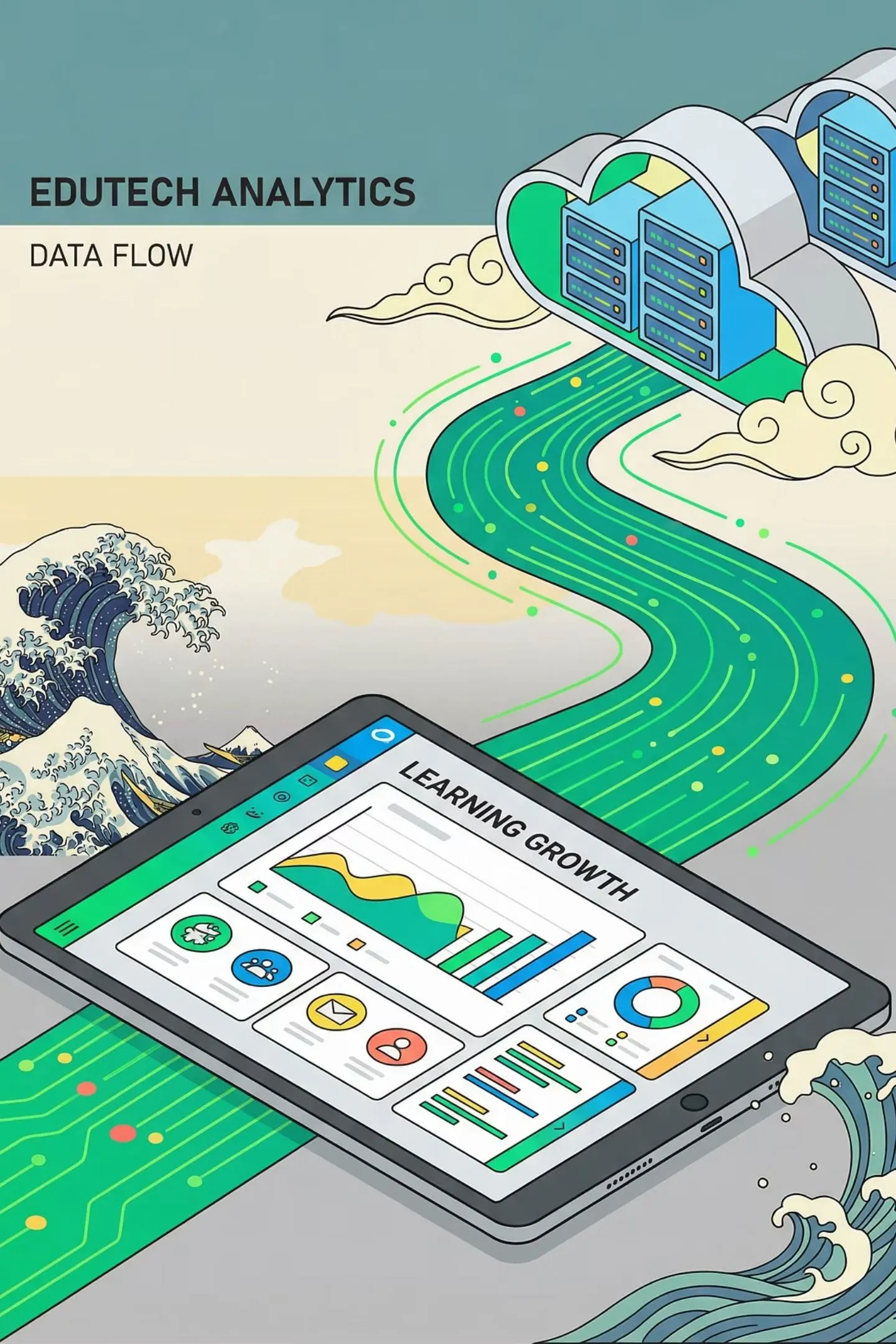
Offline first. Capture learning on the tablet and sync with one click when a connection is available.
Local storage captures all classroom activity and student performance.
One-click upload syncs the data whenever connectivity is available.
A central, secure database holds learning outcomes from across the state.
Real-time insight for school administrators, district officers and state leadership.
One tablet, a connected display and a classroom ready to learn.
One tablet per classroom of 20 to 30 students, connected to a TV display.
The teacher logs in once and enters the class roster.
The teacher selects the subject and topic from a clean, organised dashboard.
The interactive lesson launches on the TV with 3D visuals.
Every child participates, and every child builds confidence.
3D lessons fill the classroom screen.
Interactive questions appear during the lesson to check understanding.
The system calls a student's name at random, so every child gets a turn.
The teacher enters the student's answer on the tablet.
A correct answer earns points. An incorrect one passes to the next student.
Offline first. Capture learning on the tablet and sync with one click when a connection is available.
Local storage captures all classroom activity and student performance.
One-click upload syncs the data whenever connectivity is available.
A central, secure database holds learning outcomes from across the state.
Real-time insight for school administrators, district officers and state leadership.
Designed with your department
You decide how TurboKids looks, sounds and reports in your state.

Build the right curriculum, language and learning journey with teachers at the heart of it.
Map every chapter to the state syllabus and learning outcomes.
Narration and on-screen text in the languages children use.
A learning experience that reflects your state.
Lesson checks and exams.
Classroom kit, home app, or both.
Dashboards from school to state.
Choose the grades, districts and timeline.
It can be mapped to the programme’s learning outcomes using original content. Textbook text and images are not reproduced.
Language scope is confirmed during the programme brief rather than claimed here without a verified list.
The syllabus, language, delivery setting, training and evaluation approach are agreed before a pilot is proposed.
Bring the learning outcomes, language requirements, grades in scope, representative classroom conditions and the decisions the programme reports must support.
The review should cover classroom operation, teacher support, device and connectivity responsibilities, data arrangements and the evidence required for an expansion decision.
Every conversation has a starting point
Choose the conversation you need, then add the details that will help explain your question.
Your draft stays on this device until you choose to email it to contactus@kitmek.com.